We’re excited to announce that SimpleSSM now supports AWS Single Sign-On (SSO) via AWS Identity Center, making it even easier to securely connect to your EC2 instances using Session Manager — without managing long-lived access keys.
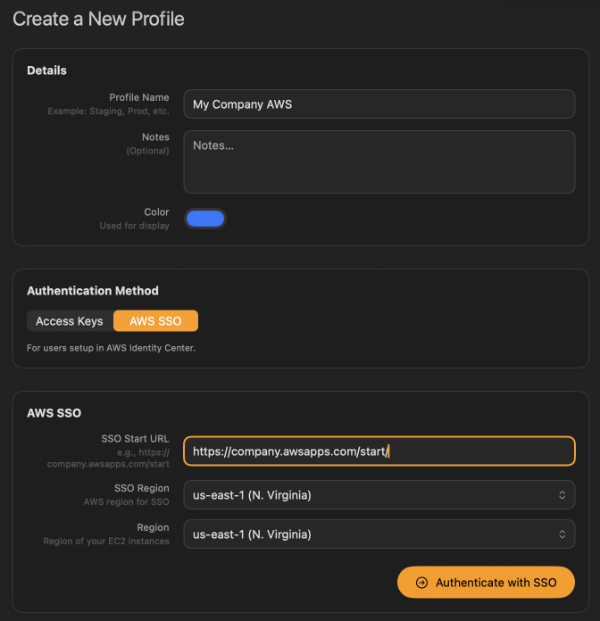
For organizations that rely on centralized identity and short-lived credentials, this is a major improvement. You can now authenticate with the same AWS SSO workflow you already use in the AWS Console or CLI, then launch SSM terminal sessions to your EC2 instances directly from SimpleSSM. This means better security, cleaner credential management, and a smoother experience for teams operating across multiple AWS accounts and environments.
If you’ve been searching for a macOS terminal for EC2 with AWS SSO support, SimpleSSM delivers a native, fast, and developer-friendly solution. Combined with multi-account profile management, one-click connections, and secure Session Manager access (no SSH ports required), SSO support makes SimpleSSM a powerful alternative to traditional SSH-based workflows.
Why AWS SSO Matters
Using AWS Identity Center provides:
- Short-lived credentials instead of static access keys
- Centralized user management and permission control
- Improved compliance and security posture
- Easier onboarding for teams and enterprises
With SimpleSSM, you get all of those benefits in a dedicated macOS app designed specifically for EC2 connectivity.
Built for Secure EC2 Access
SimpleSSM connects to your instances using AWS Systems Manager Session Manager, meaning:
- No inbound SSH ports
- No bastion hosts
- No key file management
- Full IAM-based access control
Now with SSO support, the authentication experience matches modern AWS security best practices.
Don’t worry — SimpleSSM continues to work seamlessly with traditional AWS Access Key ID and Secret Access Key credentials. If you prefer static credentials, nothing changes — SSO support is simply an additional option, not a requirement.
AWS SSO (Identity Center) compatibility is available now in the latest version of SimpleSSM.